<?xml version="1.0" encoding="utf-8"?><feed xmlns="http://www.w3.org/2005/Atom" ><generator uri="https://jekyllrb.com/" version="3.10.0">Jekyll</generator><link href="https://www.simplesportscaster.com/feed.xml" rel="self" type="application/atom+xml" /><link href="https://www.simplesportscaster.com/" rel="alternate" type="text/html" /><updated>2026-04-10T13:17:42-07:00</updated><id>https://www.simplesportscaster.com/feed.xml</id><title type="html">SimpleSportsCaster</title><subtitle>GitHub.io hosted pages for www.simplesportscaster.com</subtitle><entry><title type="html">SimpleSportsCaster Pricing Update</title><link href="https://www.simplesportscaster.com/help/pricing" rel="alternate" type="text/html" title="SimpleSportsCaster Pricing Update" /><published>2021-08-17T12:00:00-07:00</published><updated>2021-08-17T12:00:00-07:00</updated><id>https://www.simplesportscaster.com/help/pricing-update</id><content type="html" xml:base="https://www.simplesportscaster.com/help/pricing"><![CDATA[<p>SimpleSportsCaster is phasing out subscriptions in favor of one-time purchases.</p>

<p>To our loyal subscribers: <strong>Thank you!</strong> Your Basic or Deluxe subscriptions will automatically convert to a perpetual Basic or Deluxe license that never expires. You can keep using the same great features of SimpleSportsCaster unlocked by your subscription but without paying any more subscription fees.</p>

<!--more-->

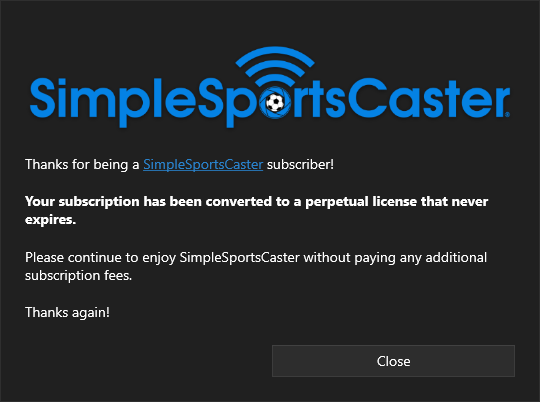
<p>After SimpleSportsCaster successfully converts your subscription to a perpetual license, you’ll see a message like this.</p>

<figure class="image">
    <img src="/assets/posts/subscription-conversion-dialog.png" alt="SimpleSportsCaster subscription conversion message" style="padding-bottom: 10px" />
    <figcaption>SimpleSportsCaster subscription conversion message</figcaption>
</figure>

<p>As before, the Basic license unlocks live streaming and recording without any time limits. The Deluxe license unlocks all of the advanced features of SimpleSportsCaster.</p>

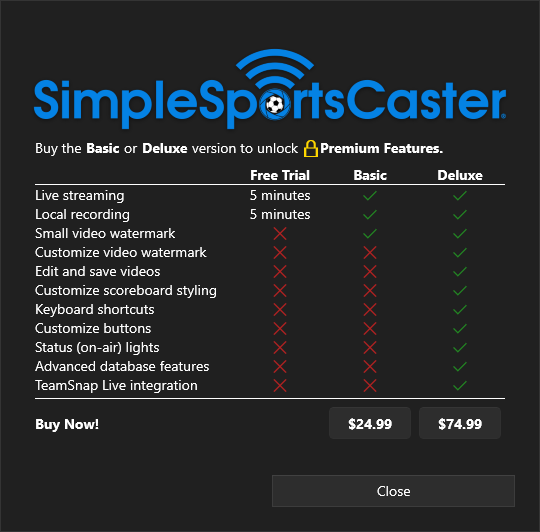
<p>Here are the feature and pricing options:</p>

<figure class="image">
    <img src="/assets/posts/buy-dialog.png" alt="SimpleSportsCaster license levels and pricing (shown in USD)" style="padding-bottom: 10px" />
    <figcaption>SimpleSportsCaster license levels and pricing (shown in USD)</figcaption>
</figure>

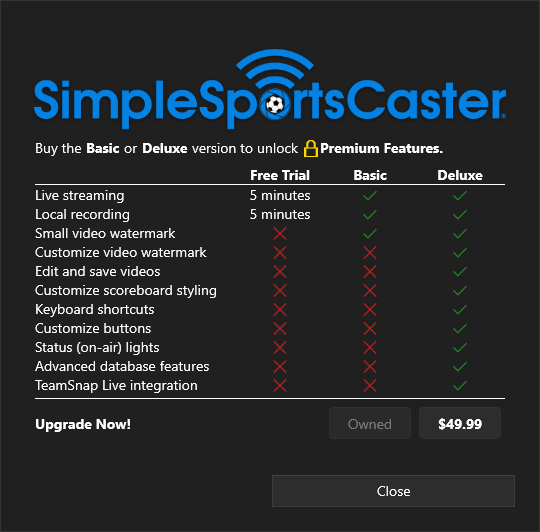
<p>There is also upgrade pricing if you have the Basic license and want to unlock all of the Deluxe features.</p>

<figure class="image">
    <img src="/assets/posts/upgrade-dialog.png" alt="SimpleSportsCaster upgrade pricing (shown in USD)" style="padding-bottom: 10px" />
    <figcaption>SimpleSportsCaster upgrade pricing (shown in USD)</figcaption>
</figure>

<p>If you have comments or questions about the subscription conversion process or the new pricing, please contact us by <a href="mailto:info@simplesportscaster.com">email</a> or by using our <a href="/contact">contact form</a>.</p>

<p>If you want to use SimpleSportsCaster in your club, school, or business, we have other licensing options available, including volume options. Get in touch by <a href="mailto:info@simplesportscaster.com">email</a> or by using our <a href="/contact">contact form</a> and we’ll be happy to discuss the other options with you.</p>

<p>Thanks and happy filming!</p>]]></content><author><name>AdamZofware</name></author><summary type="html"><![CDATA[SimpleSportsCaster is phasing out subscriptions in favor of one-time purchases. To our loyal subscribers: Thank you! Your Basic or Deluxe subscriptions will automatically convert to a perpetual Basic or Deluxe license that never expires. You can keep using the same great features of SimpleSportsCaster unlocked by your subscription but without paying any more subscription fees.]]></summary></entry><entry><title type="html">SimpleSportsCaster Subscription Plans</title><link href="https://www.simplesportscaster.com/blog/subscription-plans" rel="alternate" type="text/html" title="SimpleSportsCaster Subscription Plans" /><published>2021-01-17T11:00:00-08:00</published><updated>2021-01-17T11:00:00-08:00</updated><id>https://www.simplesportscaster.com/blog/subscription-plans</id><content type="html" xml:base="https://www.simplesportscaster.com/blog/subscription-plans"><![CDATA[<p>[Note: SimpleSportsCaster has phased out subscriptions in favor of one-time purchases. <a href="/help/pricing">Please refer to the new pricing page</a>.]</p>

<p>Starting in February 2021, we introduced a number of subscription options for SimpleSportsCaster. There are two subscription levels, Basic and Deluxe, available for purchase.</p>

<p>The Basic subscription unlocks live streaming and recording without any time limits. The Deluxe subscription unlocks all of the advanced features of SimpleSportsCaster. Each subscription level has a free trial so you can try things out before you buy.</p>

<!--more-->

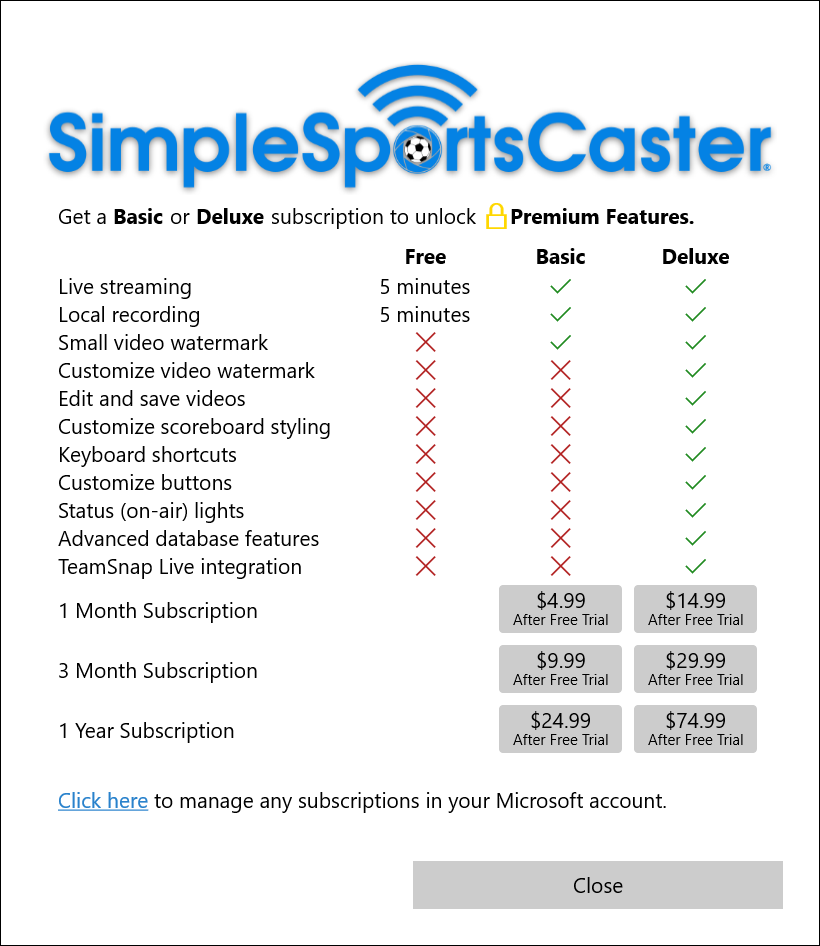
<p>Here are the feature and pricing options:</p>

<figure class="image">
    <img src="/assets/posts/subscription-dialog.png" alt="SimpleSportsCaster subscription levels and pricing" style="padding-bottom: 10px" />
    <figcaption>SimpleSportsCaster subscription levels and pricing</figcaption>
</figure>

<p>At the same time, the beta test period has come to a close. Thanks to everyone who gave us feedback during the beta!</p>

<p>If you have comments or questions about the subscription plans, please contact us by <a href="mailto:info@simplesportscaster.com">email</a> or by using our <a href="/contact">contact form</a>.</p>

<p>If you want to use SimpleSportsCaster in your club, school, or business, we have other licensing options available, including volume options. Get in touch by <a href="mailto:info@simplesportscaster.com">email</a> or by using our <a href="/contact">contact form</a> and we’ll be happy to discuss the other options with you.</p>

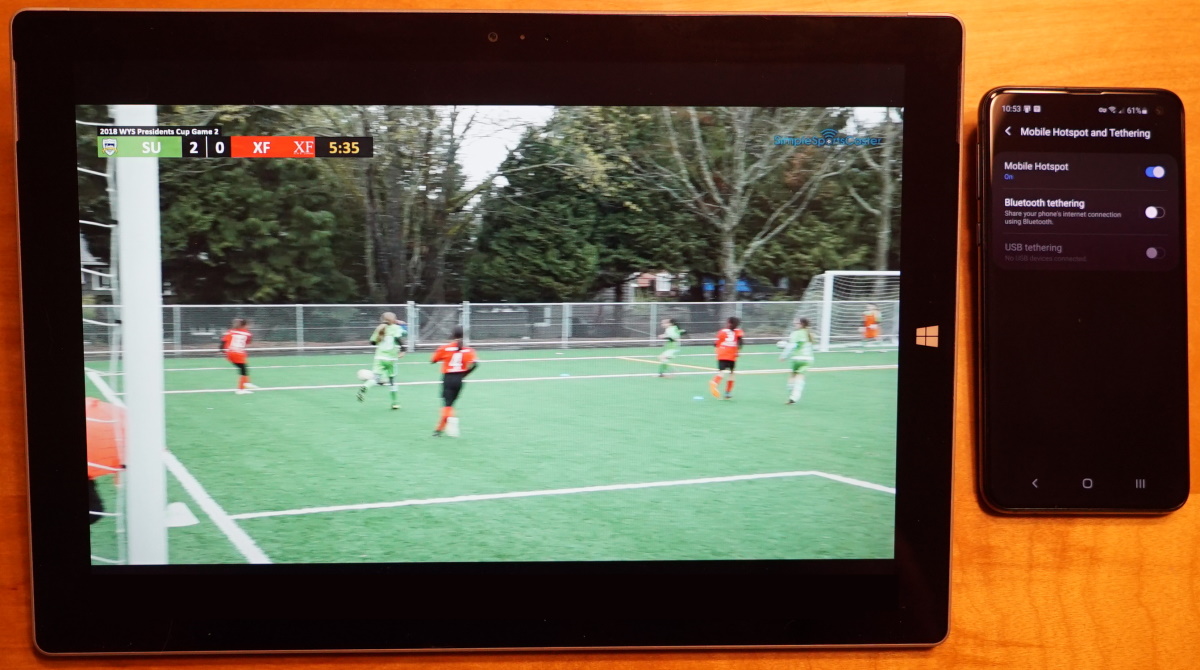
<p>Thanks and happy filming!</p>]]></content><author><name>AdamZofware</name></author><summary type="html"><![CDATA[[Note: SimpleSportsCaster has phased out subscriptions in favor of one-time purchases. Please refer to the new pricing page.] Starting in February 2021, we introduced a number of subscription options for SimpleSportsCaster. There are two subscription levels, Basic and Deluxe, available for purchase. The Basic subscription unlocks live streaming and recording without any time limits. The Deluxe subscription unlocks all of the advanced features of SimpleSportsCaster. Each subscription level has a free trial so you can try things out before you buy.]]></summary></entry><entry><title type="html">Equipment Options for SimpleSportsCaster</title><link href="https://www.simplesportscaster.com/blog/equipment-options" rel="alternate" type="text/html" title="Equipment Options for SimpleSportsCaster" /><published>2020-12-01T11:00:00-08:00</published><updated>2020-12-01T11:00:00-08:00</updated><id>https://www.simplesportscaster.com/blog/equipment-options</id><content type="html" xml:base="https://www.simplesportscaster.com/blog/equipment-options"><![CDATA[<p>One of the great things about SimpleSportsCaster is that it doesn’t take too much investment in equipment to get started. In fact, you might already own some of what you need. For example, if you have a Windows 10 laptop or tablet that can play video games then it’s probably got more than enough power to run SimpleSportsCaster too. You can use the camera built right into your laptop or tablet to film your games. With your phone as a wi-fi hotspot you can live stream your games to your audience. No other equipment required!</p>

<!--more-->

<figure class="image">
    <img src="/assets/posts/surface-pro-3-and-phone.jpg" alt="Surface Pro 3 and phone hotspot" style="padding-bottom: 10px" />
    <figcaption>Surface Pro 3 and phone hotspot</figcaption>
</figure>

<p>Here are several other <a href="/help/machines">laptops and tablets</a> that we’ve used with SimpleSportsCaster.</p>

<h3 id="capturing-better-video">Capturing Better Video</h3>

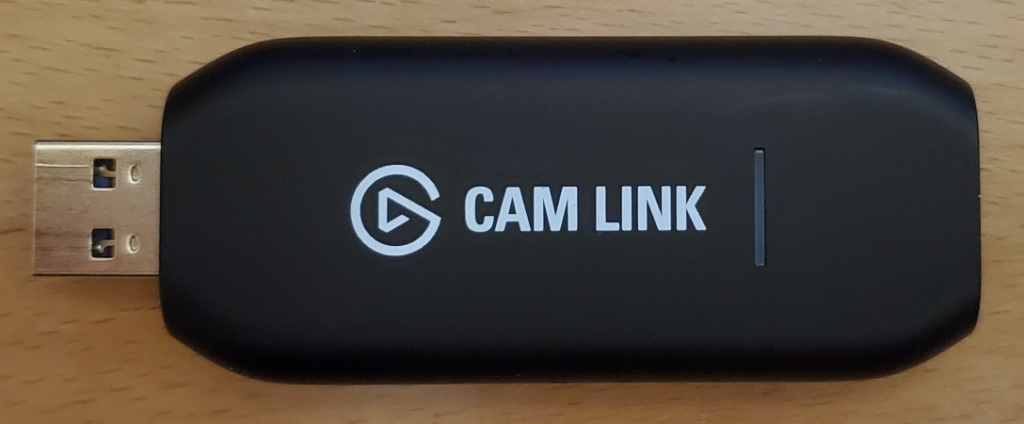
<p>Maybe you already have a camcorder or other camera that can output video over HDMI. You can start using your camera with SimpleSportsCaster by adding a small video capture device and some cables. For about $130 you can buy an Elgato Cam Link that will connect your camera to your laptop or tablet via USB 3. Other <a href="/help/capture-devices">video capture options</a> are available too.</p>

<figure class="image">
    <img src="/assets/posts/camlink.jpg" alt="Elgato Cam Link video capture device" style="padding-bottom: 10px" />
    <figcaption>Elgato Cam Link video capture device</figcaption>
</figure>

<h3 id="going-all-out">Going All Out</h3>

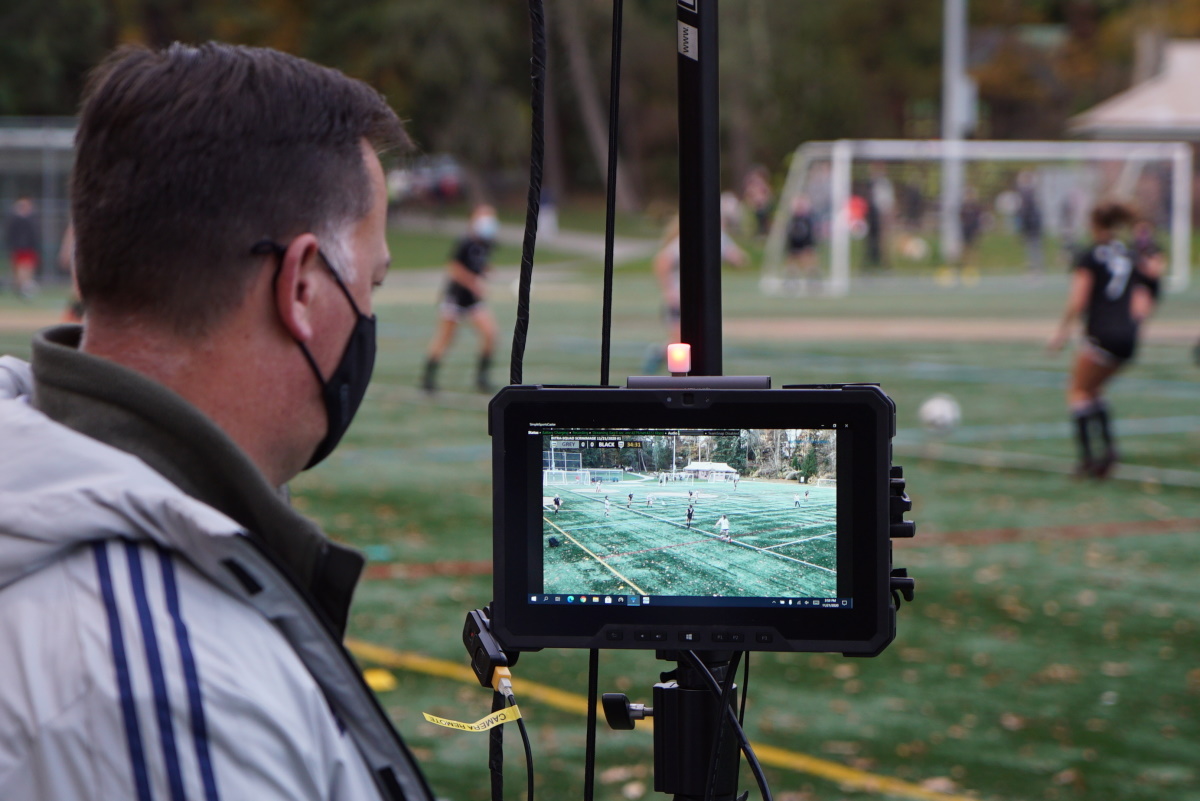
<p>If you want to go all out and build a no-compromises rugged, customized tablet that can do it all and run for hours and hours, then <a href="/project/rugged-tablet">check out this system</a> we built for <a href="https://www.seattleunited.com">Seattle United FC</a>. It makes the perfect companion for the club’s Hi-Pod camera systems and adds a scoreboard and game clock to their game film while letting the families and fans watch live via YouTube. Check out <a href="http://video.seattleunited.soccer">Seattle United on YouTube</a> for some of the club’s recent broadcasts.</p>

<figure class="image">
    <img src="/assets/projects/rugged/completed-project-5.jpg" alt="Rugged tablet on Hi-Pod" style="padding-bottom: 10px" />
    <figcaption>Rugged tablet on Hi-Pod</figcaption>
</figure>]]></content><author><name>AdamZofware</name></author><summary type="html"><![CDATA[One of the great things about SimpleSportsCaster is that it doesn’t take too much investment in equipment to get started. In fact, you might already own some of what you need. For example, if you have a Windows 10 laptop or tablet that can play video games then it’s probably got more than enough power to run SimpleSportsCaster too. You can use the camera built right into your laptop or tablet to film your games. With your phone as a wi-fi hotspot you can live stream your games to your audience. No other equipment required!]]></summary><media:thumbnail xmlns:media="http://search.yahoo.com/mrss/" url="https://www.simplesportscaster.com/assets/posts/surface-pro-3-and-phone.jpg" /><media:content medium="image" url="https://www.simplesportscaster.com/assets/posts/surface-pro-3-and-phone.jpg" xmlns:media="http://search.yahoo.com/mrss/" /></entry><entry><title type="html">Heat Part 2</title><link href="https://www.simplesportscaster.com/blog/heat-part-2" rel="alternate" type="text/html" title="Heat Part 2" /><published>2019-08-23T19:14:12-07:00</published><updated>2019-08-23T19:14:12-07:00</updated><id>https://www.simplesportscaster.com/blog/heat-part-2</id><content type="html" xml:base="https://www.simplesportscaster.com/blog/heat-part-2"><![CDATA[<p>This is a followup to my post earlier this summer about <a href="/blog/heat">filming in the heat</a>. Since then I’ve found a few ways to help keep my tablet happier when filming on hot days.</p>

<p>Note: As an Amazon Associate this web site earns from qualifying purchases.</p>

<h3 id="sport-brella-versa-brella">Sport-Brella Versa-Brella</h3>
<p>For keeping my tablet out of the sun, I’ve been using the <a href="https://amzn.to/2ZnmduK">Versa-Brella</a> from <a href="https://amzn.to/31VLTA0">Sport-Brella</a>. It’s a highly adjustable clamp-on umbrella that I attach to my tripod and it works really well as long as there’s not too much wind. As a bonus it also keeps my head out of the sun while I’m filming.</p>

<center>
    <a href="https://www.amazon.com/Sport-Brella-Versa-Brella-Swiveling-Umbrella-Midnight/dp/B00HA2ZKCO/ref=as_li_ss_il?ref_=bl_dp_s_web_3043383011&amp;linkCode=li3&amp;tag=zofwarellc-20&amp;linkId=b57ff33239fcc3a7d69913348247f1c5&amp;language=en_US" target="_blank">
        <img border="0" src="//ws-na.amazon-adsystem.com/widgets/q?_encoding=UTF8&amp;ASIN=B00HA2ZKCO&amp;Format=_SL250_&amp;ID=AsinImage&amp;MarketPlace=US&amp;ServiceVersion=20070822&amp;WS=1&amp;tag=zofwarellc-20&amp;language=en_US" />
    </a>
    <img src="https://ir-na.amazon-adsystem.com/e/ir?t=zofwarellc-20&amp;language=en_US&amp;l=li3&amp;o=1&amp;a=B00HA2ZKCO" width="1" height="1" border="0" alt="" style="border:none !important; margin:0px !important;" />

    <script type="text/javascript">
        amzn_assoc_tracking_id = "zofwarellc-20";
        amzn_assoc_ad_mode = "manual";
        amzn_assoc_ad_type = "smart";
        amzn_assoc_marketplace = "amazon";
        amzn_assoc_region = "US";
        amzn_assoc_design = "enhanced_links";
        amzn_assoc_asins = "B00HA2ZKCO";
        amzn_assoc_placement = "adunit";
        amzn_assoc_linkid = "180b10f3cb17a2d1a8f87888220deb62";
    </script>
    <script src="//z-na.amazon-adsystem.com/widgets/onejs?MarketPlace=US"></script>
</center>

<h3 id="arctic-breeze-mobile-usb-fan">ARCTIC Breeze Mobile USB fan</h3>
<p>On really, really hot days (like Dallas in June!) I’ve found that this <a href="https://amzn.to/2KQYT4e">ARCTIC Breeze Mobile</a> USB fan aimed at the right spot on the back of my tablet can help keep the temps from getting too high. I plug it into a spare USB power port on my <a href="https://amzn.to/325bpDf">portable battery pack</a>.</p>

<center>
    <a href="https://www.amazon.com/gp/product/B003XN24GY/ref=as_li_ss_il?ie=UTF8&amp;linkCode=li3&amp;tag=zofwarellc-20&amp;linkId=8a623e05ff3a5f99cea26a4b39edab59&amp;language=en_US" target="_blank">
        <img border="0" src="//ws-na.amazon-adsystem.com/widgets/q?_encoding=UTF8&amp;ASIN=B003XN24GY&amp;Format=_SL250_&amp;ID=AsinImage&amp;MarketPlace=US&amp;ServiceVersion=20070822&amp;WS=1&amp;tag=zofwarellc-20&amp;language=en_US" />
    </a>
    <img src="https://ir-na.amazon-adsystem.com/e/ir?t=zofwarellc-20&amp;language=en_US&amp;l=li3&amp;o=1&amp;a=B003XN24GY" width="1" height="1" border="0" alt="" style="border:none !important; margin:0px !important;" />

    <script type="text/javascript">
        amzn_assoc_tracking_id = "zofwarellc-20";
        amzn_assoc_ad_mode = "manual";
        amzn_assoc_ad_type = "smart";
        amzn_assoc_marketplace = "amazon";
        amzn_assoc_region = "US";
        amzn_assoc_design = "enhanced_links";
        amzn_assoc_asins = "B003XN24GY";
        amzn_assoc_placement = "adunit";
        amzn_assoc_linkid = "53a4b8d692d270b9d911095a42f6542a";
    </script>
    <script src="//z-na.amazon-adsystem.com/widgets/onejs?MarketPlace=US"></script>
</center>

<h3 id="monitoring-temperature-and-throttling">Monitoring Temperature and Throttling</h3>

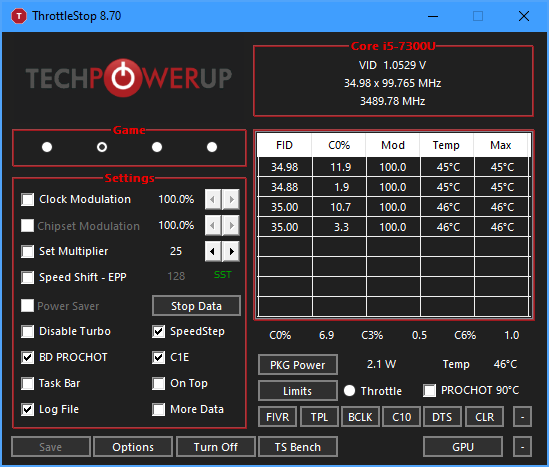
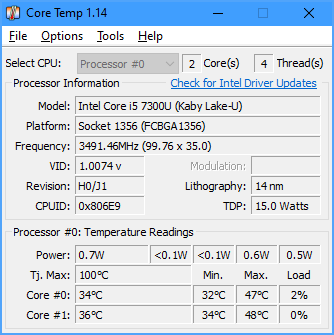
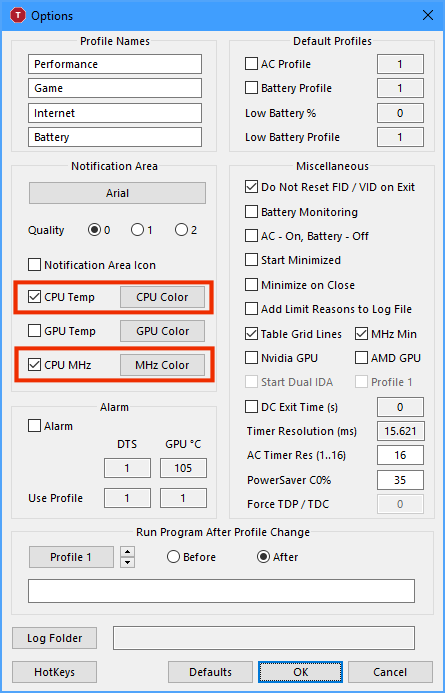
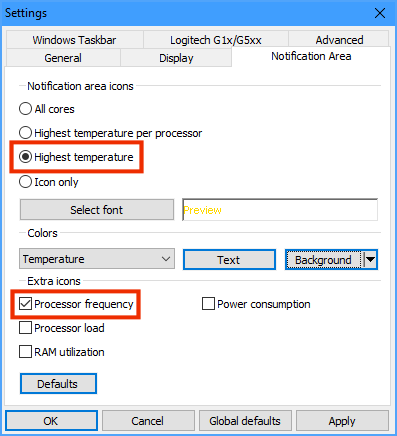
<p>There are a number of free programs you can run on your Windows tablet, laptop, or computer to monitor the CPU temperature and show if it’s being throttled down to avoid overheating. Two of my favorites are <a href="https://www.techpowerup.com/download/techpowerup-throttlestop/">ThrottleStop</a> and <a href="https://www.alcpu.com/CoreTemp/">Core Temp</a>. Both can show your CPU temperature and clock speed on the Windows taskbar so you can keep an eye on them while filming.</p>

<p>When I use either one, I like to configure the clock speed in green and the temperature in yellow but you can set it up however you like. My Surface Pro tends to start throttling when the temperature gets above 60° C so I try to keep the temperatures below that. I can tell if my tablet is throttling if the speed ever drops below the normal speed of 3.5 GHz.</p>

<table>
  <thead>
    <tr>
      <th> </th>
      <th style="text-align: center">ThrottleStop</th>
      <th style="text-align: center">Core Temp</th>
    </tr>
  </thead>
  <tbody>
    <tr>
      <td>Tray</td>
      <td style="text-align: center"><img src="/assets/posts/throttlestop-tray.png" alt="ThrottleStop tray" /></td>
      <td style="text-align: center"><img src="/assets/posts/coretemp-tray.png" alt="Core Temp tray" /></td>
    </tr>
    <tr>
      <td>Main screen</td>
      <td style="text-align: center"><img src="/assets/posts/throttlestop-main.png" alt="ThrottleStop main" /></td>
      <td style="text-align: center"><img src="/assets/posts/coretemp-main.png" alt="Core Temp main" /></td>
    </tr>
    <tr>
      <td>Options</td>
      <td style="text-align: center"><img src="/assets/posts/throttlestop-options.png" alt="ThrottleStop options" /></td>
      <td style="text-align: center"><img src="/assets/posts/coretemp-options.png" alt="Core Temp options" /></td>
    </tr>
  </tbody>
</table>

<p>Hopefully you find some of these products and tips helpful. If you have other tips for beating the heat please share them in the comments below.</p>

<p>Thanks and happy filming!<br />
-Adam
<br />
<br /></p>]]></content><author><name>AdamZofware</name></author><summary type="html"><![CDATA[This is a followup to my post earlier this summer about filming in the heat. Since then I’ve found a few ways to help keep my tablet happier when filming on hot days.]]></summary></entry><entry><title type="html">Keyboard Shortcuts</title><link href="https://www.simplesportscaster.com/blog/keyboard-shortcuts" rel="alternate" type="text/html" title="Keyboard Shortcuts" /><published>2019-07-18T23:30:00-07:00</published><updated>2019-07-18T23:30:00-07:00</updated><id>https://www.simplesportscaster.com/blog/keyboard-shortcuts</id><content type="html" xml:base="https://www.simplesportscaster.com/blog/keyboard-shortcuts"><![CDATA[<p>As of version 1.1.117.0, SimpleSportsCaster supports customizable keyboard shortcuts on the game screen. For details, look <a href="/help/keyboard-shortcuts">here</a>.</p>]]></content><author><name>AdamZofware</name></author><summary type="html"><![CDATA[As of version 1.1.117.0, SimpleSportsCaster supports customizable keyboard shortcuts on the game screen. For details, look here.]]></summary></entry><entry><title type="html">Heat</title><link href="https://www.simplesportscaster.com/blog/heat" rel="alternate" type="text/html" title="Heat" /><published>2019-06-13T17:40:00-07:00</published><updated>2019-06-13T17:40:00-07:00</updated><id>https://www.simplesportscaster.com/blog/heat</id><content type="html" xml:base="https://www.simplesportscaster.com/blog/heat"><![CDATA[<p>I’m in Dallas to see some of the games at <a href="https://premiersupercopa.com/">Supercopa 2019</a>. The quality of play here is amazing. And so is the HEAT! (At least for someone accustomed to the mild climate of the Pacific Northwest.)</p>

<p>Today I realized that the heat can make a Surface tablet pretty unhappy. Before recording a game today, my Surface was exposed to the sun for perhaps a half hour and as soon as I tried to start recording and streaming it shut itself down. After recruiting a helper to hold an umbrella over my video gear, the tablet started back up and stayed running but it was pretty clear it wasn’t in a good mood because it seemed to stay in a throttled state for the rest of the game.</p>

<p>The lesson: Don’t leave your Surface out in the sun for 30 minutes if you want it to maintain peak performance. Find something or someone to help keep it in the shade and you’ll get much better results. I’ll take this lesson to heart for day 2 in Dallas tomorrow.</p>

<p>Happy filming!<br />
-Adam</p>]]></content><author><name>AdamZofware</name></author><summary type="html"><![CDATA[I’m in Dallas to see some of the games at Supercopa 2019. The quality of play here is amazing. And so is the HEAT! (At least for someone accustomed to the mild climate of the Pacific Northwest.)]]></summary></entry></feed>